library(tidyverse)Practical 1
Data manipulation
This exercise will practice several of the ‘essential data manipulation’ tasks covered during the lecture, including selecting, sorting, merging, grouping, and summarising.
The MovieLens dataset
We’ll be using a subsample of the MovieLens dataset (available at this page). This dataset contains 20 million ratings applied to 62,000 films from 162,000 users. Fortunately, the random sample we’re using is slightly smaller: 100,000 ratings for 9,000 films.

First, load the tidyverse package:
Import and merge
- Download
movies.csvandratings.csvand import both datasets into R usingread_csv. Store as two data frames.
movies <- read_csv("../data/movies.csv")
ratings <- read_csv("../data/ratings.csv")
TipTip: Portable paths with the
here package
You can use the here package to construct portable file paths (i.e., paths that work across machines). Once you’ve created an RStudio project:
library(here)here() starts at /Users/ewan/Sync/Work/Projects/Active/Introduction to R (HDR UK March 2026)/websitemovies <- read_csv(here("data", "movies.csv"))Rows: 9742 Columns: 3── Column specification ────────────────────────────────────────────────────────
Delimiter: ","
chr (2): title, genres
dbl (1): movieId
ℹ Use `spec()` to retrieve the full column specification for this data.
ℹ Specify the column types or set `show_col_types = FALSE` to quiet this message.ratings <- read_csv(here("data", "ratings.csv"))Rows: 100836 Columns: 4
── Column specification ────────────────────────────────────────────────────────
Delimiter: ","
dbl (4): userId, movieId, rating, timestamp
ℹ Use `spec()` to retrieve the full column specification for this data.
ℹ Specify the column types or set `show_col_types = FALSE` to quiet this message.This assumes movies.csv and ratings.csv are stored in a folder called data, located in the root of your project.
- Merge the two data frames (
movies,ratings) to create a single data frame with 100,836 rows and 6 columns.
Bonus questions:
- What’s the difference between
full_joinandinner_joinin this instance? - Which column was used to merge the two data frames? How could you specify this yourself?
Summarise
Calculate the mean rating per film.
Hint: You’ll need to use
group_byandsummarise.
- What is the range of average scores?
- How many films share the top average rating?
Creating new columns
- Use the below code to create a new column containing the year each film was released.
av <- av |>
    mutate(year = str_extract(title, "[0-9]{4}.$"),
           year = parse_number(year)) |>
    drop_na(year)
Bonus questions:
- What’s going on here? What does
[0-9]{4}.$represent? - Why have we used a
drop_nastatement?
- Calculate the average rating per year. Store the result in a new data frame, sorted by year (earliest to latest).
Plotting
- (Optional) Plot the average rating (y-axis) by year (x-axis).
We haven’t covered plotting yet, but it seemed natural that we’d want to plot something at this stage. So for now, try (copy-and-paste) either of the below options (you may need to adjust the variable names, depending on what you chose above):
Using base R
plot(per_year$year, per_year$year_mean)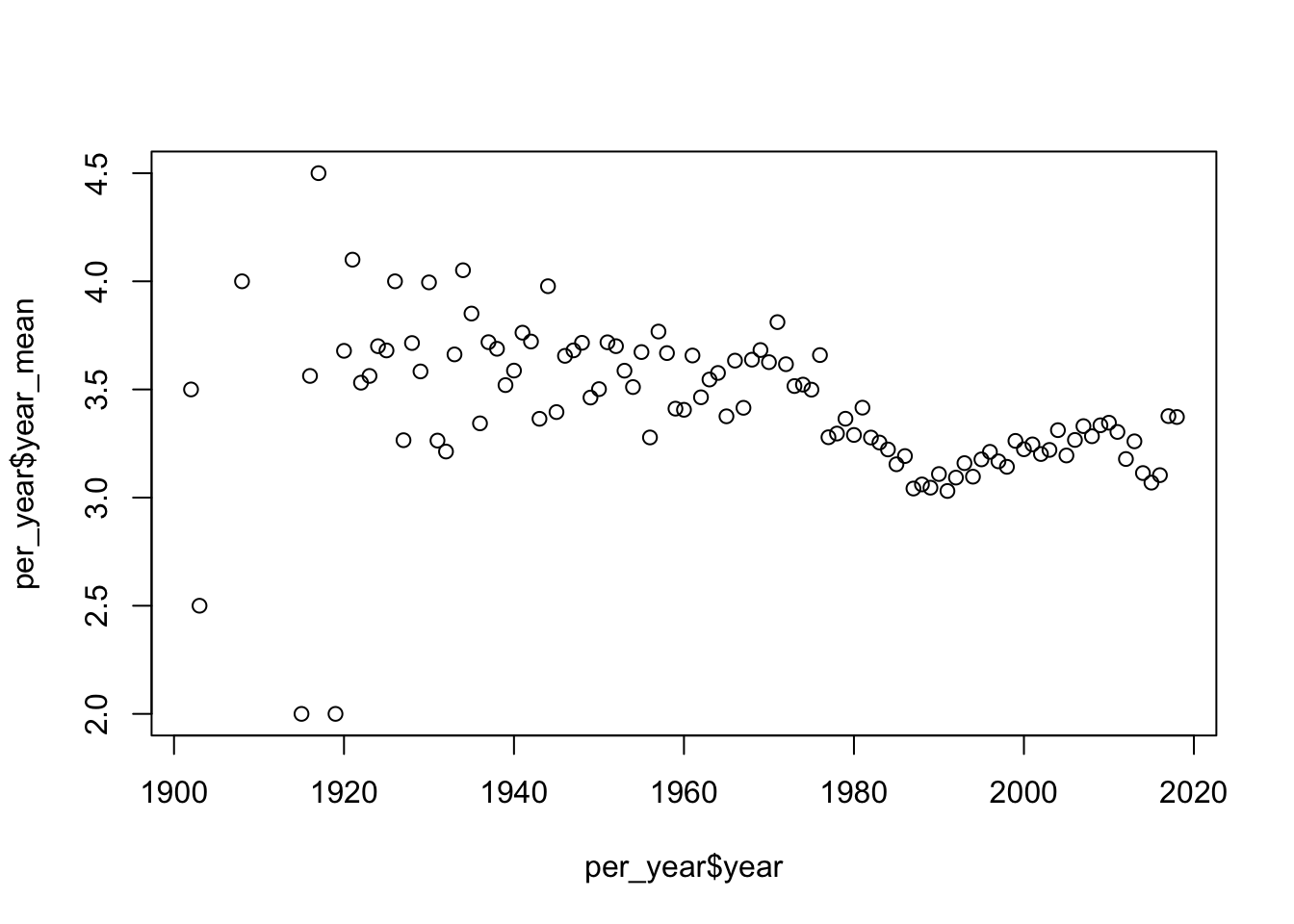
Using ggplot2
per_year |>
  ggplot() +
  aes(x = year,
      y = year_mean) +
  geom_point() +
  geom_smooth()
`geom_smooth()` using method = 'loess' and formula = 'y ~ x'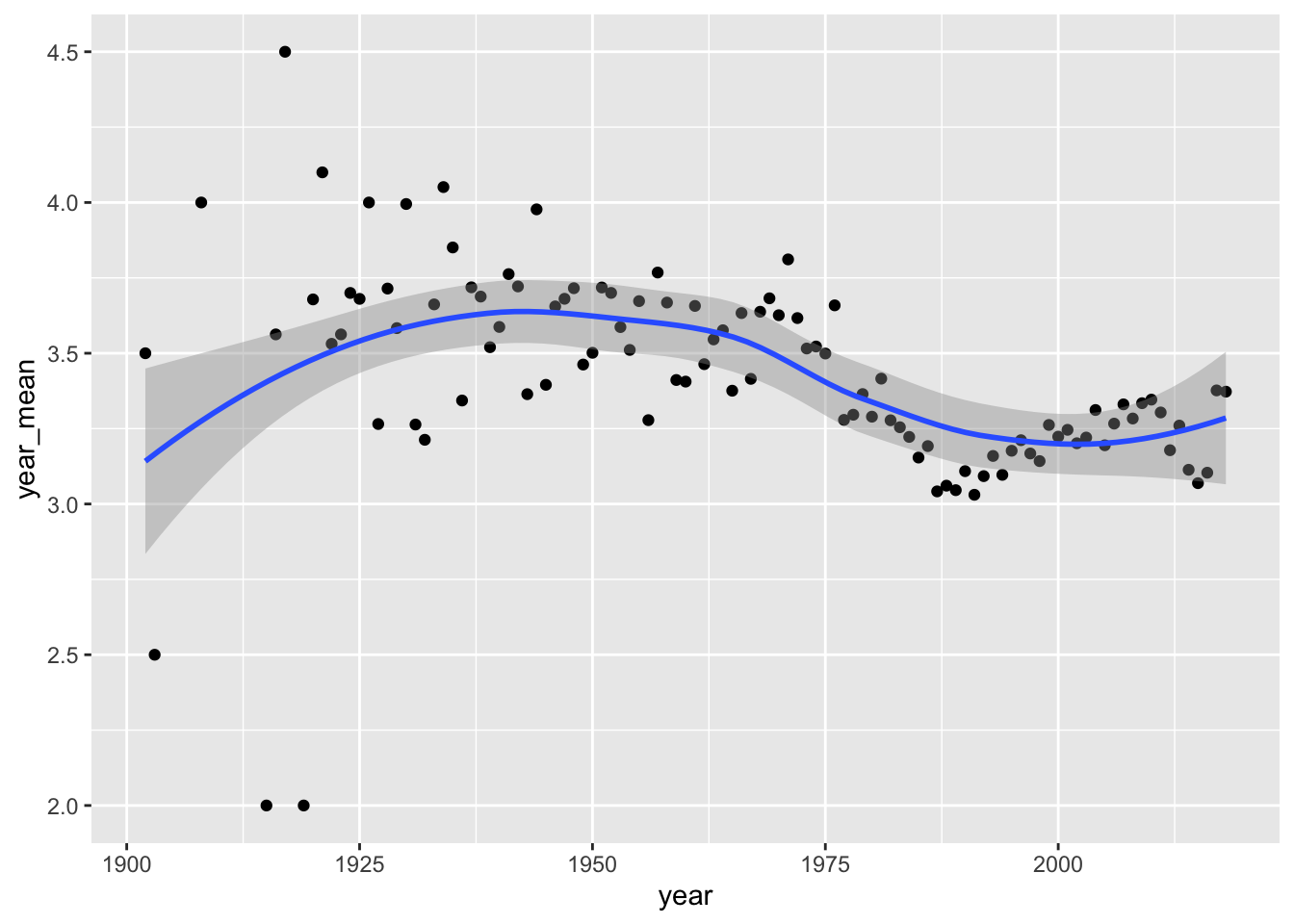
Calculate the correlation between
yearandrating.How would you characterise the trend in movie ratings over time?
- Calculate the average rating per genre (optional).
You’ll need to split the genre column, reshape, and then recalculate the average grouped score.
Going further with MovieLens
NoteThis section is optional
We won’t have time to go through this exercise, but I’ve included it here in case you want more practice in your own time.
In this section, we’re interested in movie grossings – how much money did each film take at the box office? Do higher-rated films tend to make more money? What rating should a film have, to maximise the box office takings?
We’ll be using a couple of more advanced techniques:
- Scraping data from a website;
- Merging and data cleaning.
The MovieLens dataset doesn’t include information on grossings, but we can find this information at https://www.boxofficemojo.com/chart/top_lifetime_gross/.
- Use the
rvestpackage to scrape information from this page for the top 1000 films. You should store this information in a data frame with four columns:rank,title,lifetime_gross,year.
library(rvest)
Attaching package: 'rvest'The following object is masked from 'package:readr':
guess_encoding# Create a vector containing the required URLs
url <- "https://www.boxofficemojo.com/chart/top_lifetime_gross"
offsets <- seq(0, 800, 200)
all_pages <- str_glue("{url}/?offset={offsets}")
# For each page, scape the HTML and extract the table
# Using a loop:
tables <- list()
for (i in seq_along(all_pages)) {
cat(paste("Extracting page:", all_pages[i], "\n"))
tables[[i]] <- html_table(read_html(all_pages[i]))
}
# Using map:
tables <- map(all_pages, \(p) html_table(read_html(p)))The read_page and html_table functions will extract the table from a single page, but we’re interested in the top grossing 1000 films, so we’ll need to access multiple pages.
To do this, we need to figure out the URL format:
- For the first page, it’s https://www.boxofficemojo.com/chart/top_lifetime_gross/
- For the second page, it’s https://www.boxofficemojo.com/chart/top_lifetime_gross/?offset=200
- For the third page, it’s https://www.boxofficemojo.com/chart/top_lifetime_gross/?offset=400
So, subsequent pages are specified via the offset argument in the URL. Therefore, we can create a vector containing all required pages and scape the table from each page.
- You should now have a list of five data frames. Combine these into a single data frame.
Check that your combined dataset has 1000 rows and 4 columns.
- Rename the column names and convert the
Lifetime Grosscolumn to a numeric type.
- Merge this data frame with the ‘mean move ratings’ data frame we generated above (
av).
- Of the 1000 films in the ‘highest grossing’ data, for how many do we have a corresponding rating for?
both <- grossing |>
  mutate(title = str_glue("{title} ({year})")) |>
  full_join(av)
Joining with `by = join_by(title, year)`table(!is.na(both$lifetime_gross) & !is.na(both$mean_rating))
FALSE  TRUE
 9451   628
The first challenge here is that, in MovieLens, the title includes the year:
’71 (2014)
Whereas grossing does not:
Star Wars: Episode VII - The Force Awakens
So, for the formats to match, we need to either remove or add the year. Seeing as we have the year column available in grossing, we can use that.
A second challenge is the difference in how “The…” is handled. In grossing it is before the movie name (e.g., “The Lion King”):
grossing |> filter(str_detect(title, "The"))# A tibble: 229 × 4
rank title lifetime_gross year
<dbl> <chr> <dbl> <int>
1 1 Star Wars: Episode VII - The Force Awakens 936662225 2015
2 7 Avatar: The Way of Water 688459501 2022
3 14 The Avengers 623357910 2012
4 15 Star Wars: Episode VIII - The Last Jedi 620181382 2017
5 17 The Super Mario Bros. Movie 574934330 2023
6 18 The Lion King 543638043 2019
7 19 The Dark Knight 534987076 2008
8 21 Star Wars: Episode IX - The Rise of Skywalker 515202542 2019
9 23 Star Wars: Episode I - The Phantom Menace 487576624 1999
10 31 The Dark Knight Rises 448149584 2012
# ℹ 219 more rowsWhereas in the ratings data it is after:
av |> filter(str_detect(title, "The"))# A tibble: 2,244 × 3
title mean_rating year
<chr> <dbl> <dbl>
1 'Hellboy': The Seeds of Creation (2004) 4 2004
2 'Til There Was You (1997) 4 1997
3 'burbs, The (1989) 3.18 1989
4 10th Kingdom, The (2000) 2.75 2000
5 10th Victim, The (La decima vittima) (1965) 4 1965
6 11th Hour, The (2007) 4 2007
7 13th Warrior, The (1999) 2.90 1999
8 2 Fast 2 Furious (Fast and the Furious 2, The) (2003) 2.61 2003
9 2010: The Year We Make Contact (1984) 3.59 1984
10 39 Steps, The (1935) 4.05 1935
# ℹ 2,234 more rowsSo, we’ll miss many movies with “The” in the title. If you like, have a go at fixing this. (I haven’t provided code for this, yet).
- Using any method you like, answer the two questions below:
- Do higher rated films make more money?
- What rating should a film have, to maximise the box office takings? What other factors should you consider here?
NoteSolution
# The below code is just one way of answering this question -- many other
# solutions are possible.

# First, let's select films for which we have grossing and rating data:

both <- drop_na(both)

# Second, I'm going to scale the units to "millions of $" so they're easier to
# work with.

both$millions <- both$lifetime_gross / 1e6

summary(both$millions)
Min. 1st Qu. Median Mean 3rd Qu. Max.
87.07 107.29 136.92 170.99 200.08 936.66 hist(both$millions)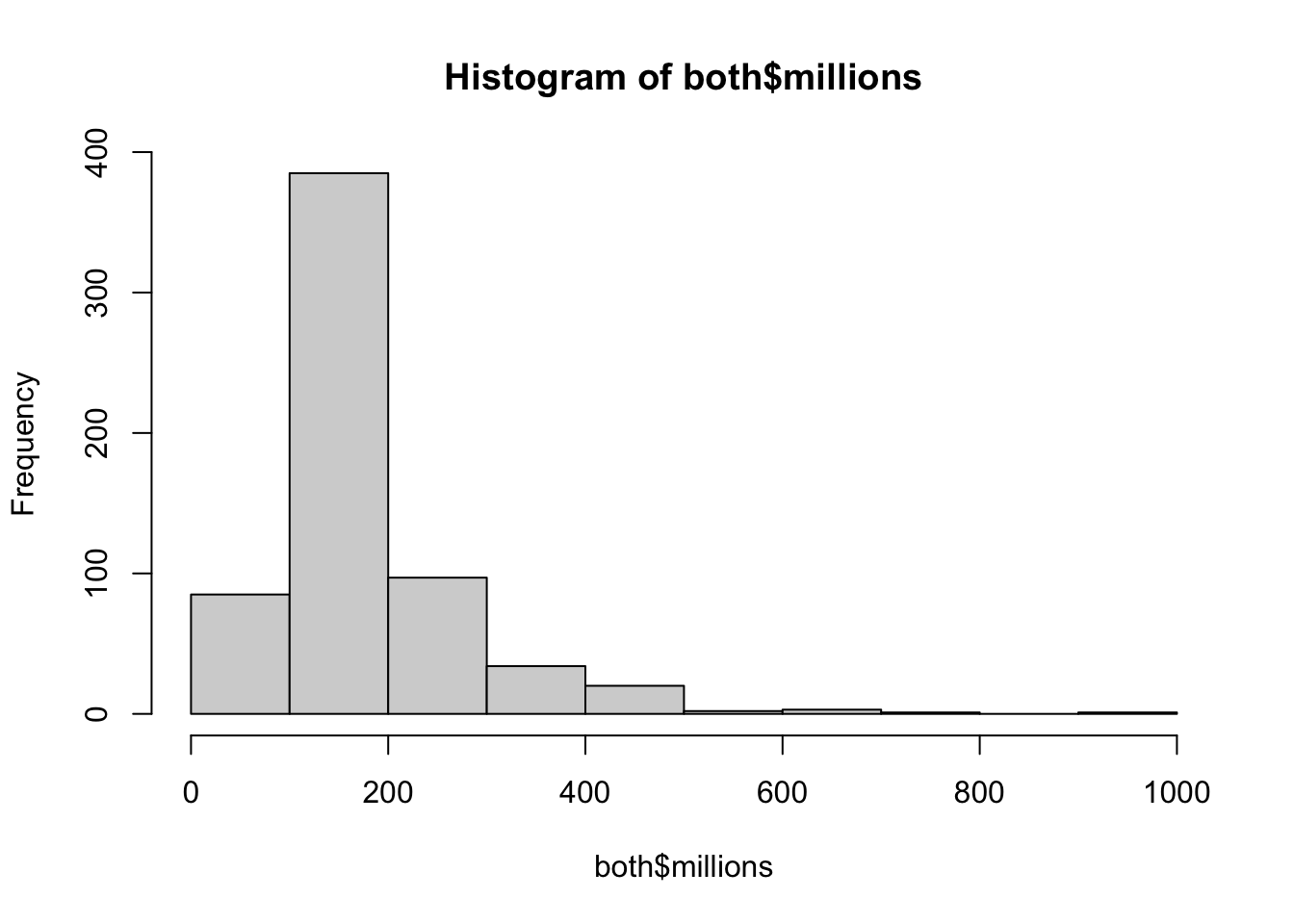
# There are a few films (e.g., "Star Wars: Episode VII" and "Avatar") that
# had were very high grossing. They're not outliers, but I'm going to remove
# them for now.

tail(arrange(both, millions))
# A tibble: 6 × 6
rank title lifetime_gross year mean_rating millions
<dbl> <glue> <dbl> <dbl> <dbl> <dbl>
1 20 Rogue One: A Star Wars Story … 533539991 2016 3.93 534.
2 16 Incredibles 2 (2018) 608581744 2018 3 609.
3 10 Jurassic World (2015) 653406625 2015 3.26 653.
4 9 Titanic (1997) 674354882 1997 3.41 674.
5 4 Avatar (2009) 785221649 2009 3.60 785.
6 1 Star Wars: Episode VII - The … 936662225 2015 3.85 937.both <- both |> filter(millions < 600)
# We can now plot the linear relationship between ratings and grossings:
both |>
ggplot() +
aes(x = mean_rating,
y = log(lifetime_gross)) +
geom_point(alpha = 0.5) +
geom_smooth(method = "lm")`geom_smooth()` using formula = 'y ~ x'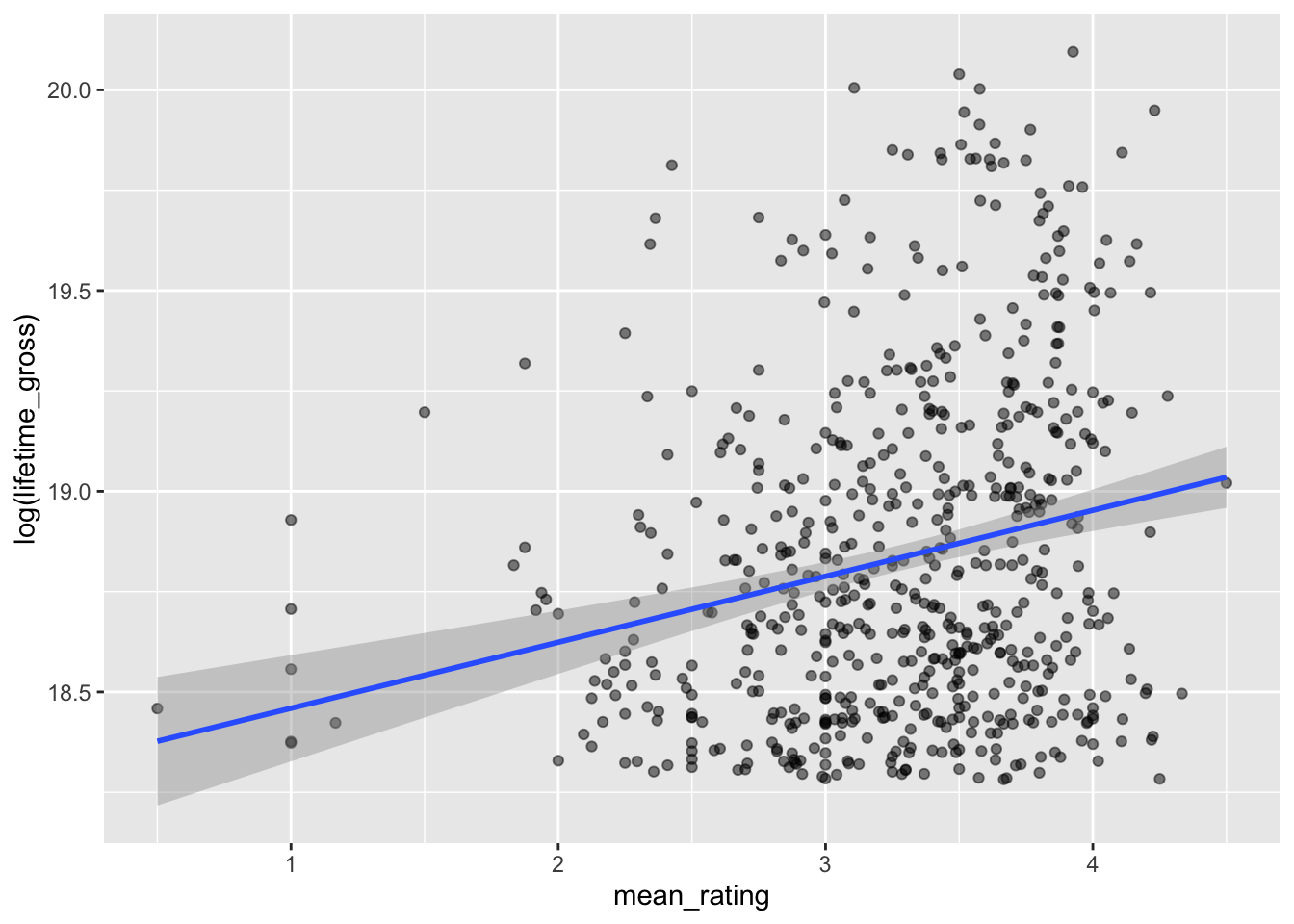
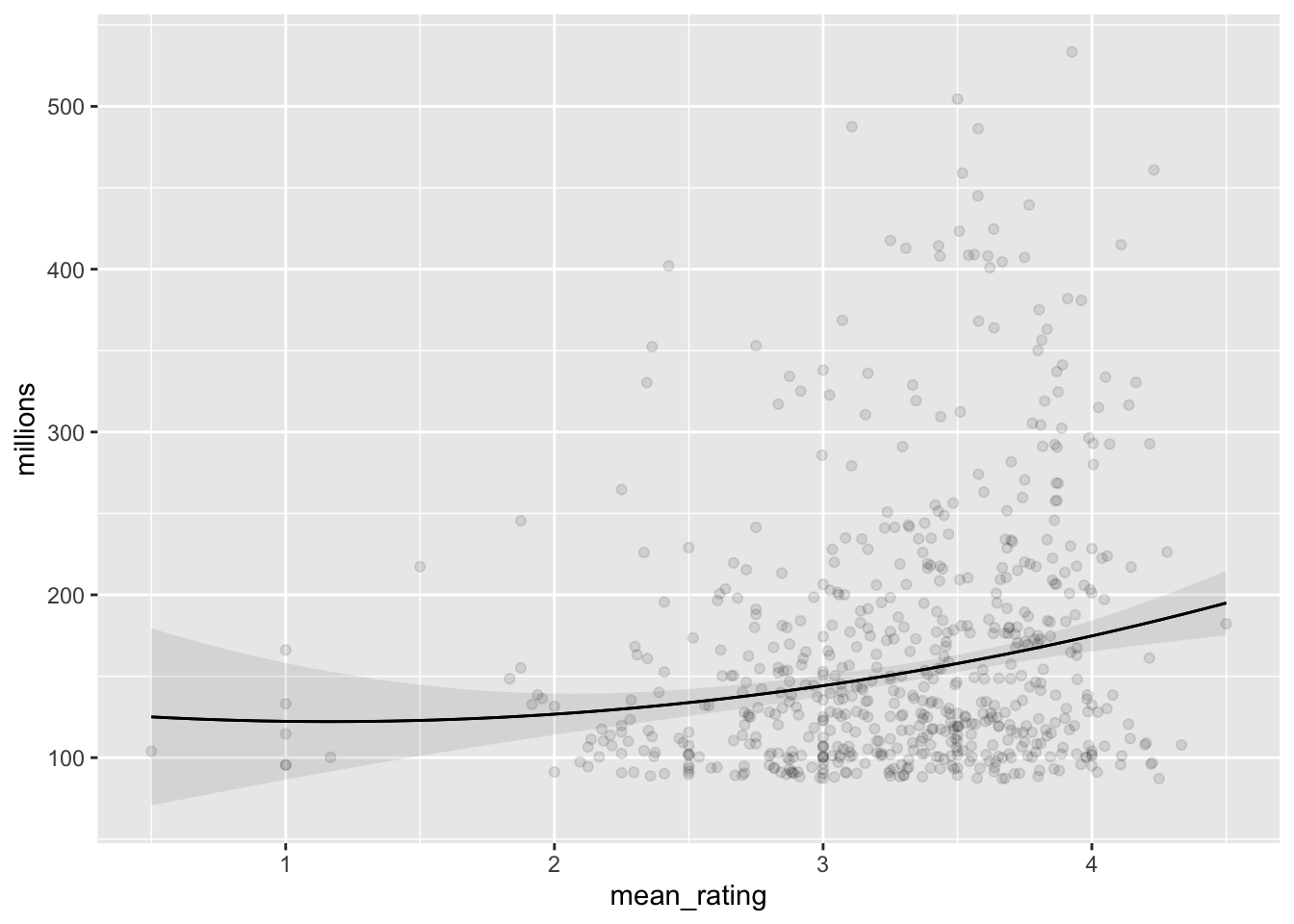
# It's quite likely that the relationship is non-linear. Therefore, let's use
# the 'marginaleffects' package to plot predictions from a linear model with
# a quadratic term.

library(marginaleffects)

# Linear model, quadratic slope
fit_lm <- lm(millions ~ mean_rating + I(mean_rating^2),
             data = both)
plot_predictions(fit_lm, "mean_rating", points = 0.2)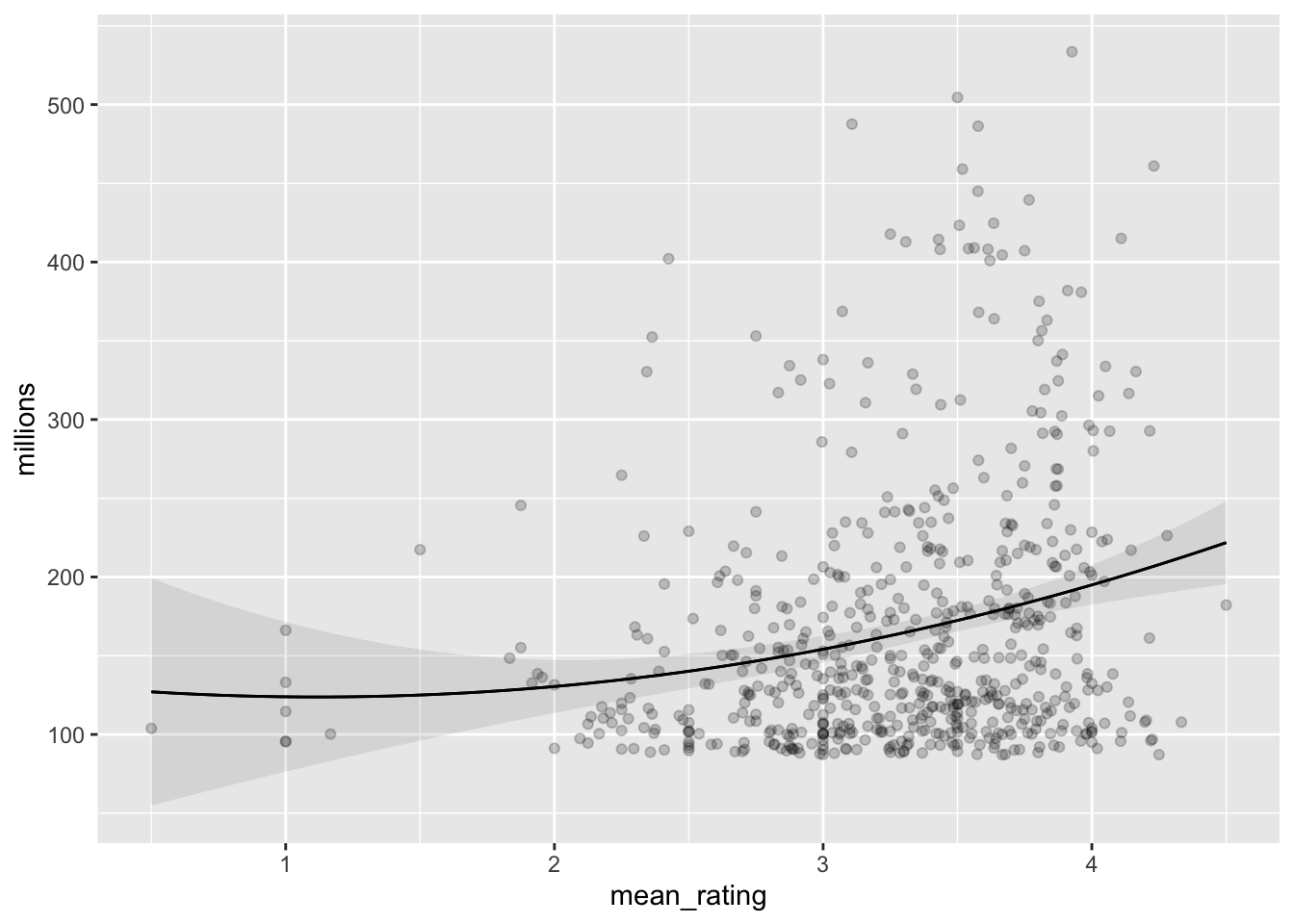
# Robust linear model, quadratic slope
fit_rlm <- MASS::rlm(millions ~ mean_rating + I(mean_rating^2),
                     data = both)
plot_predictions(fit_rlm, "mean_rating", points = 0.1)